
Hengchang YiDe · Product
HaoHao Schedule
Multiple course sources, unified management
One schedule, shared by many; local-first, works offline.
Get Started →
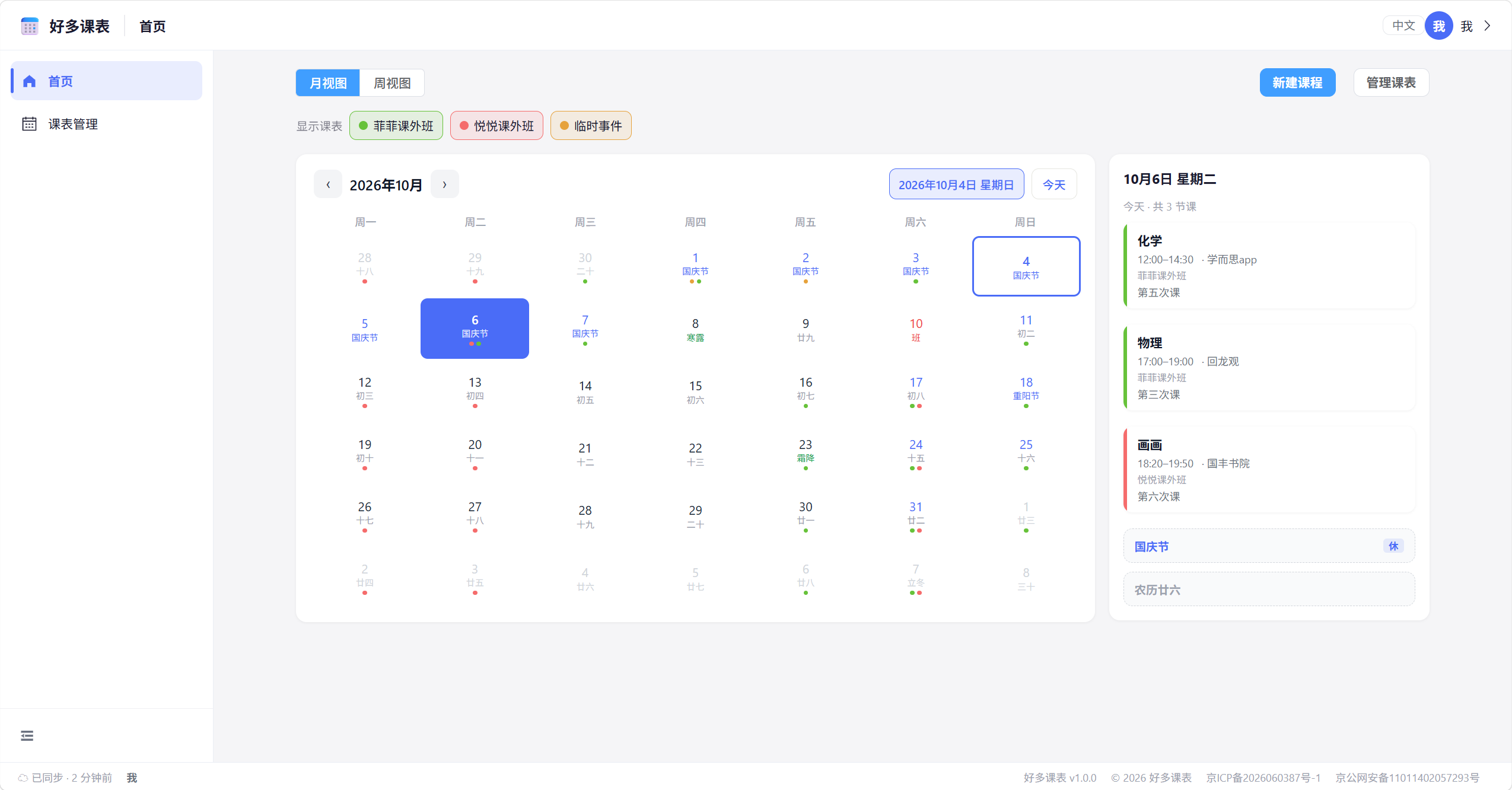
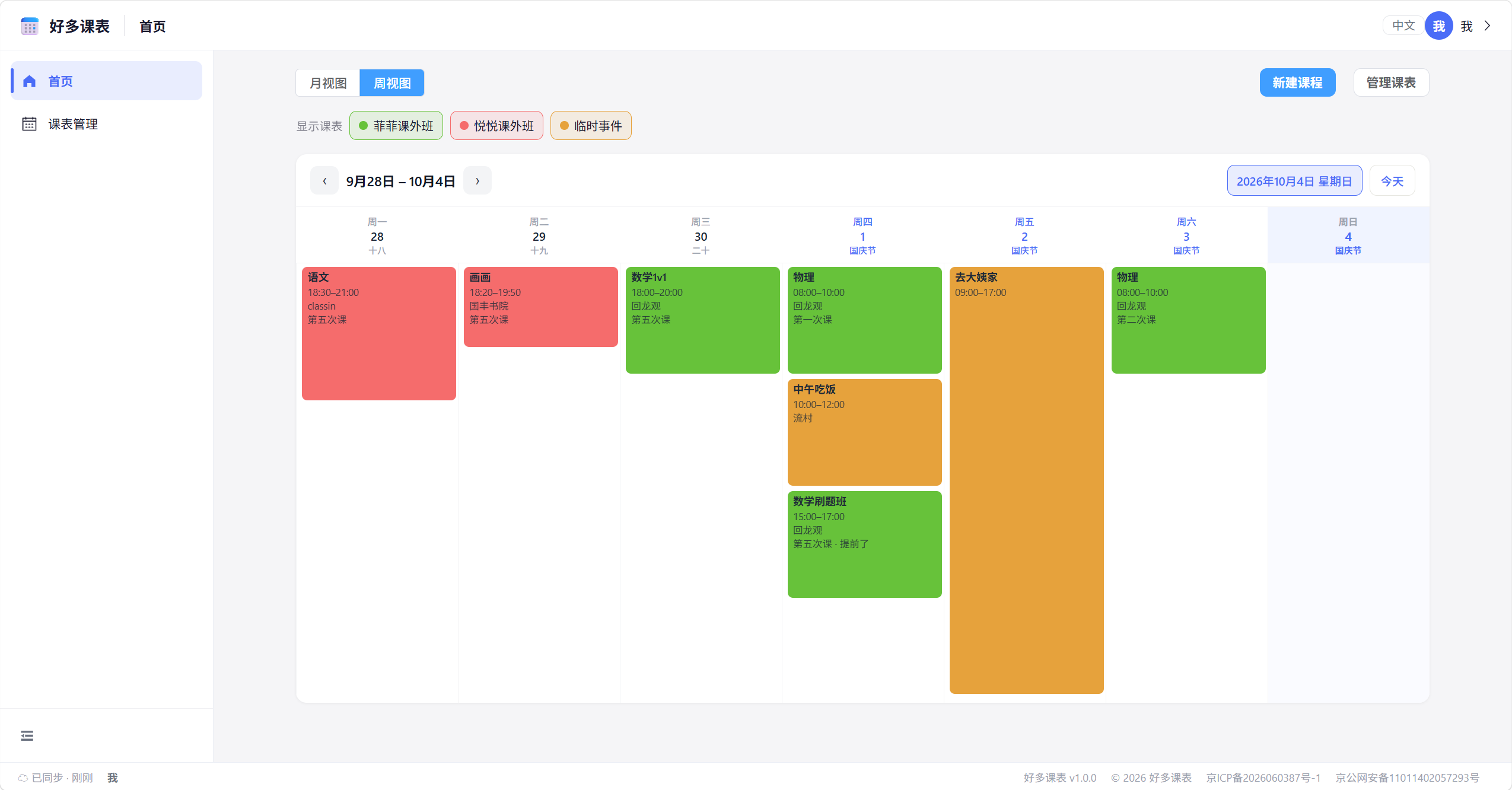
Month and week views for different viewing habits
Built for effortless schedule management
Each course source becomes its own schedule, viewed together on the home calendar; toggle visibility anytime—yours and shared-with-you stay clearly separate.
A schedule can generate a share link or invite members (by user ID / email), with "view-only" and "editable" permissions—multiple people maintain it together, saving time and effort.
Switch instantly between month calendar and week grid; today's courses, holidays and lunar dates show on the same screen—your plan at a glance.
Usable without login—data stays on device, viewable offline, instant to open; after login it auto-syncs incrementally to the cloud, no loss across devices, consistent everywhere.
Courses are organized as template–instance: edit "this single session / all / from a certain day onward"; supports repeat (once·consecutive·weekly), end date and skip dates.
Ink-dark text on warm paper-white, a 10-color palette to tell sources apart, a 4px spacing grid and soft shadows—clean, restrained, comfortable for long viewing.
From adding to sharing, made easy
First create a schedule as the container for courses (you can create several for different sources)—a prerequisite before adding courses.
Add courses to the schedule, fill in name, time and location, set repeat rules and skip dates; preview instantly in month / week views.
After login, data auto-syncs to the cloud with no loss across devices; or generate a share link to invite others to maintain the same schedule together.
Different roles, same ease
As a high-school sophomore, I used to keep separate tables for school classes, evening self-study and weekend tutoring, and always mixed them up. Now each is its own schedule—the home month view shows at a glance where to go and what's on today, and the week view keeps me on track for the week.
As a homeroom teacher, the worst part is schedule changes not reaching everyone. I generate a share link for the class schedule and post it in the group; students join with the link code set to "view-only", and when I change it once, everyone sees it—far fewer group messages.
My child shares the schedule with me, and I joined with a single link code. No more chasing "which period today, where?"; I just open it and see—a lot more peace of mind.
I commute between two cities and have changed phones. HaoHao Schedule works without login; after login data auto-syncs to the cloud and restores with one tap on a new device. The local copy still works offline—perfect for someone like me who's often offline with unstable network.
As class representative, the scariest part of arranging schedules is one change rippling everywhere. Its "template–instance" is thoughtful: change just one session on a day, or change from a certain day onward while keeping the past; repeat and skip dates can be set separately—flexible yet tidy.
During exam prep I also put my self-study plan into the schedule; the week view shows the whole week at a glance. For winter/summer breaks I use "skip dates" to auto-empty vacation days, and it still flips through offline—focus uninterrupted.
Start using HaoHao Schedule now and leave course management to us.
Get Started →